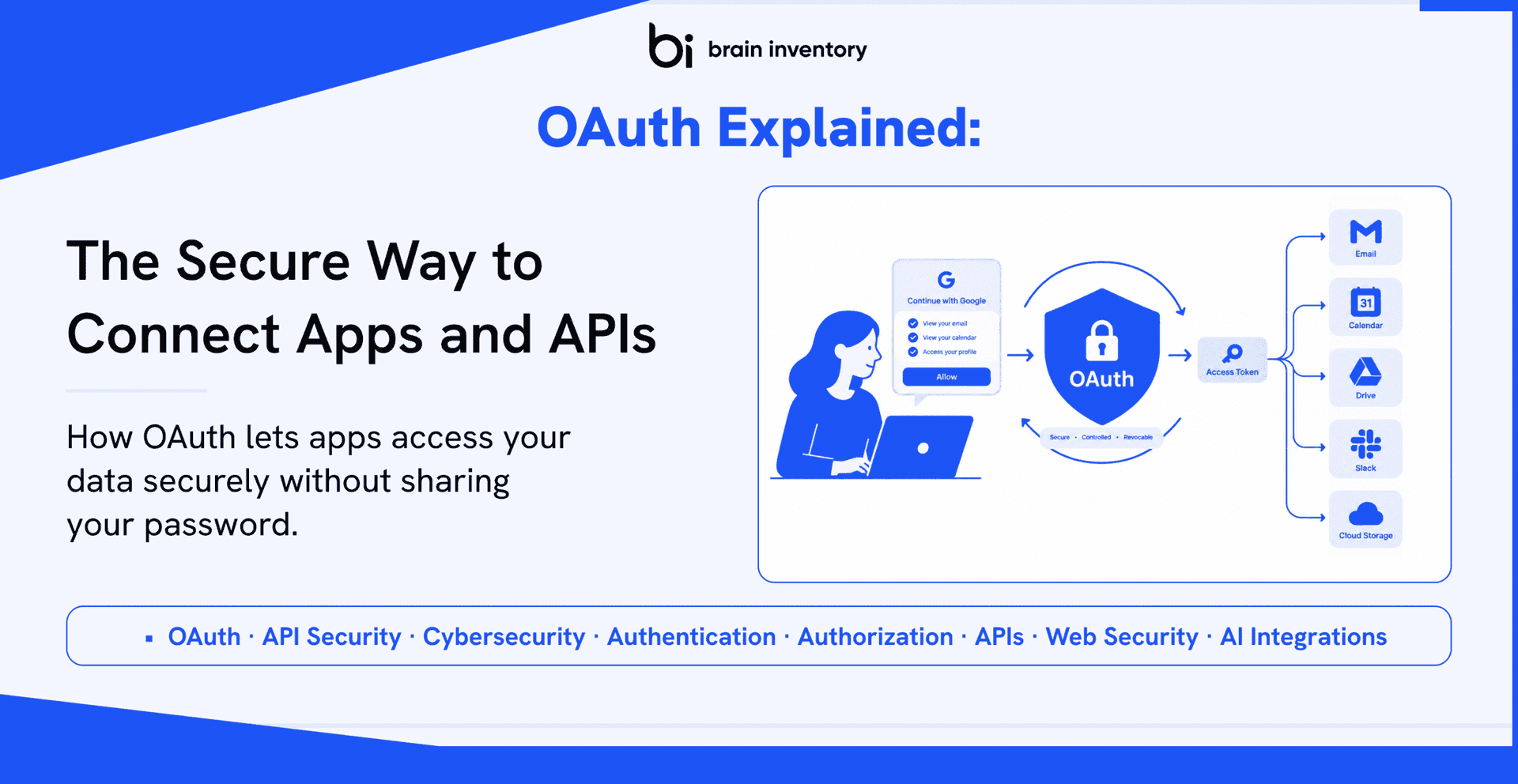
Have you ever noticed how easy it has become to connect one application with another? You can sign in to a new service using your Google account, link Slack with Google Calendar, or allow an AI assistant to access your emails in just a few clicks. Usually, you visit a familiar login page, approve a few permissions, and connect the application without sharing your password. This seamless experience relies on a security framework that has transformed how applications communicate with each other.
Today’s digital ecosystem depends on connected services. Businesses use specialized applications for communication, project management, customer relationships, payments, cloud storage, analytics, and collaboration. These applications exchange information through APIs to create efficient workflows. AI has accelerated this trend, allowing assistants to access calendars, emails, document repositories, and business tools to automate repetitive tasks. Without a secure authorization mechanism, users would have to share their passwords with every application they wanted to connect.
This is exactly the problem OAuth solves. Instead of collecting and storing sensitive credentials, applications use OAuth to request limited access to a user’s data. The framework establishes trust between users, client applications, and service providers while keeping permissions controlled, transparent, and revocable. As a result, OAuth has become a fundamental technology for API authorization and secure software integrations.
Despite its widespread adoption, OAuth remains one of the most misunderstood concepts in software development. Developers often confuse it with authentication, social login, or encryption. Some understand how to implement OAuth libraries but struggle to explain what happens behind the scenes when someone clicks “Continue with Google.” Others find authorization codes, access tokens, refresh tokens, scopes, and grant types difficult to understand because technical explanations often lack practical examples.
This guide takes a practical approach. We’ll begin with the problem OAuth solves, then explore how the framework works, why secure API integrations depend on it, and how modern applications exchange information safely. By the end, you’ll understand OAuth’s core concepts and appreciate its role in connecting web applications, cloud platforms, enterprise systems, and AI-powered solutions.
Why Did the Internet Need OAuth?
To understand OAuth’s importance, let’s look at how applications communicated before delegated authorization became common. Imagine downloading a photo editing application that wants to import pictures from your Google Photos account. An older integration might ask for your Google username and password so the application can access your account directly.
Although this approach worked, it created several serious security risks. First, users had to trust third-party applications with their most sensitive credentials. If an application suffered a data breach or stored passwords insecurely, attackers could potentially access the entire account. Password reuse made the problem even worse because one compromised service could expose emails, cloud storage, financial information, and other accounts.
Another major limitation involved permissions. A photo editing application might need permission only to view your pictures, yet your password could give it access to far more information. Users had little practical control over which resources an application could access.
Revoking access also created unnecessary complications. If you stopped trusting an application, you might have to change your account password and update every legitimate application or device that depended on the same credentials. As APIs became central to software development, this approach quickly became unsustainable.
OAuth addressed these challenges by replacing password sharing with delegated authorization. You authenticate directly with a trusted provider such as Google, Microsoft, or GitHub. The provider then asks you to approve specific permissions. After you grant consent, the authorization server issues tokens that allow the application to perform authorized actions without learning your password.
You can also revoke the application’s permissions without changing your account password. This approach gives users greater control over their information, reduces the risks associated with credential sharing, and helps developers build integrations that scale securely across millions of users.
Whether you connect a CRM to your email provider, link a project management platform to your calendar, or authorize an AI assistant to retrieve documents, the principle remains the same: grant applications only the access they need.
What Is OAuth?
OAuth is an open standard for authorization that allows one application to access protected resources on behalf of a user or another authorized party without requiring the user’s password.
Rather than functioning as a complete login system, OAuth provides a framework for granting and managing permissions between applications and services.
Consider a project management platform that wants to display your upcoming Google Calendar meetings. Instead of collecting your Google credentials, the platform redirects you to Google’s authorization service. After you sign in, you can review the requested permissions and approve them if you’re comfortable with the level of access.
Google can then issue an access token that the project management platform uses to retrieve the calendar information covered by those permissions. The platform never needs to receive or store your Google password.
This permission-based model balances convenience with protection. Users can connect applications without repeatedly sharing credentials, while developers can create integrations without taking responsibility for storing highly sensitive passwords.
Authentication vs. Authorization: Understanding the Difference
People often use authentication and authorization interchangeably, but the two concepts solve different problems. Understanding this distinction makes OAuth much easier to understand.
What Is Authentication?
Authentication answers the question, “Who are you?” It verifies a user’s identity before allowing access to a system. Common methods include passwords, fingerprints, facial recognition, security keys, and multi-factor authentication.
What Is Authorization?
Authorization answers the question, “What are you allowed to access?” It determines which resources or actions a user or application can use.
An office building provides a simple analogy. Showing your employee ID proves your identity, which represents authentication. Your access card determines which departments or secure rooms you can enter, which represents authorization.
OAuth focuses on delegated authorization. It manages the permissions an application receives rather than independently verifying a user’s identity.
This distinction explains why OAuth often works alongside OpenID Connect (OIDC). OpenID Connect adds an identity layer to OAuth 2.0, allowing applications to verify a user’s identity through standardized authentication information.
How OAuth Works: Understanding the Authorization Process
Imagine you’ve started using an AI meeting assistant that needs access to your Google Calendar to schedule meetings and manage appointments. OAuth allows the assistant to request the necessary permissions without asking for your Google password.
The authorization process generally follows these steps:
- You initiate the connection. Click a button such as “Connect Google Calendar” inside the application.
- The application redirects you. The client sends an authorization request to Google’s authorization service. You sign in if necessary.
- You review the requested permissions. The provider presents a consent screen explaining the requested access, such as viewing calendar events or creating appointments.
- You approve the request. After you grant consent, the authorization server returns an authorization code to the registered redirect URI.
- The application exchanges the code for tokens. The client sends the authorization code to the token endpoint and receives an access token. Depending on the flow and provider, it may also receive a refresh token.
- The application accesses the API. The client presents the access token when requesting permitted resources.
- The API validates the request. The resource server checks the token and applicable permissions before returning the requested information.
The authorization code differs from an access token. It acts as an intermediate credential that the client exchanges at the token endpoint. Modern implementations also use protections such as secure redirect handling and PKCE where appropriate.
The key principle is simple: the application receives permission to perform approved actions instead of receiving your account password. OAuth tokens do not automatically grant unrestricted access; the provider’s policies, granted scopes, token restrictions, and resource server rules determine the effective permissions.
Understanding the Core Components of OAuth
OAuth becomes easier to understand when you recognize the role of each component in the authorization process.
1. Resource Owner
The resource owner is the entity that can authorize access to a protected resource. In a typical user-based integration, this is the person who controls the data, such as a Google Calendar owner.
2. Client Application
The client is the application requesting access to protected resources. Examples include a CRM platform, project management tool, mobile application, or AI assistant.
3. Authorization Server
The authorization server handles authorization requests, obtains the necessary consent, and issues authorization codes and tokens according to the applicable OAuth flow.
4. Resource Server
The resource server hosts protected resources and accepts requests authorized by valid access tokens. For example, a calendar API provides access to events according to the token’s permissions.
5. Tokens
Tokens represent authorization granted under defined conditions. They allow an application to access protected resources without requiring the user to repeat the authorization process for every API request.
Together, these components create a system in which an application requests permission, an authorization server issues the appropriate credentials, and a resource server enforces access rules.
Access Tokens, Refresh Tokens, and Scopes Explained
OAuth uses different mechanisms to control access and balance security with convenience. Each mechanism serves a specific purpose.
Access Tokens
An access token is a credential that a client presents when accessing protected resources. It represents the authorization the client has received, subject to the resource server’s validation rules.
Access tokens commonly have limited lifetimes. If someone steals a token, its expiration can reduce the period during which an attacker can misuse it. However, token theft remains a security risk until the token expires or the provider revokes it.
Refresh Tokens
A refresh token allows an eligible client to request a new access token from the authorization server without requiring the user to repeat the entire authorization process.
Refresh tokens need careful protection because they can provide a longer-lived route to obtaining new access tokens. Their availability and behavior depend on the authorization provider and the flow in use.
Scopes
Scopes describe the permissions a client requests during authorization. For example, a calendar integration might request permission to read events without requesting permission to modify them.
Scopes support the principle of least privilege: applications should request only the permissions necessary to perform their intended functions.
Short-lived access tokens, carefully protected refresh tokens, and narrowly defined scopes help reduce the risks associated with unauthorized access.
Choosing the Right OAuth 2.0 Flow
OAuth 2.0 supports different authorization flows for different application environments. The right choice depends on the client type, its ability to protect credentials, and whether it needs access on behalf of a user or under its own identity.
Authorization Code Flow
The Authorization Code Flow works well for server-side web applications. The client receives an authorization code and exchanges it for tokens through the authorization server’s token endpoint.
Confidential clients can authenticate securely at the token endpoint using an appropriate client authentication method.
Authorization Code Flow with PKCE
The Authorization Code Flow with Proof Key for Code Exchange (PKCE) is recommended for modern public clients, including mobile applications and browser-based applications.
PKCE binds the authorization request to the subsequent code exchange through a verifier and challenge. This mechanism helps prevent attackers from using an intercepted authorization code. Modern security guidance also recommends PKCE for confidential clients.
Client Credentials Flow
The Client Credentials Flow supports machine-to-machine authorization when a client accesses resources under its own identity rather than acting on behalf of a user.
Developers commonly use this flow for communication between backend services and automated systems.
Device Authorization Flow
The Device Authorization Flow supports devices that lack a convenient interface for traditional sign-in, such as smart TVs and certain IoT devices.
The device displays a code, and the user completes authorization on a separate device, such as a smartphone or laptop.
Which OAuth Flows Should You Avoid?
The Implicit Flow and Resource Owner Password Credentials Grant are not recommended for modern applications. Current security guidance favors authorization code-based approaches, with PKCE for public clients, rather than exposing access tokens in browser redirects or asking applications to handle users’ passwords directly.
OAuth vs. JWT vs. API Keys: Understanding the Differences
OAuth, JSON Web Tokens (JWTs), and API keys often appear together in discussions about API security. However, each technology serves a different purpose.
OAuth
OAuth is an authorization framework. It defines how clients obtain permission to access protected resources and how authorization credentials are issued and used.
JWT
A JSON Web Token (JWT) is a token format for representing claims in a compact, structured form. JWTs can contain information such as issuer, subject, audience, expiration time, and other claims.
Some OAuth providers issue access tokens in JWT format, but OAuth does not require JWTs. Access tokens may also be opaque strings whose meaning the authorization server and resource server understand.
API Keys
An API key commonly identifies an application or project and helps providers manage API usage. For example, a weather API might use a key to associate requests with an account and enforce usage limits.
An API key alone does not provide the delegated authorization workflow OAuth offers for granting an application controlled access to a user’s protected resources.
In simple terms, OAuth manages delegated authorization, JWT defines a token format, and API keys commonly identify API clients. These technologies can complement one another, but they are not interchangeable.
Common OAuth Mistakes Developers Should Avoid
OAuth provides a robust authorization framework, but its security depends on correct implementation. Developers can avoid many common vulnerabilities by following established practices.
- Confusing authentication with authorization: Use OpenID Connect when an application needs standardized user authentication and identity information.
- Requesting excessive permissions: Limit scopes to the minimum access required for the application’s functionality.
- Exposing tokens: Prevent access tokens and refresh tokens from leaking through source code, logs, URLs, or insecure storage.
- Using outdated flows: Prefer modern authorization code-based flows and PKCE where appropriate.
- Failing to validate redirects: Register and validate redirect URIs to prevent authorization responses from reaching untrusted destinations.
- Ignoring token lifecycle management: Handle expiration, refresh, revocation, and refresh token rotation according to provider capabilities and security requirements.
These practices reduce the risk of unauthorized access and help developers build reliable OAuth integrations.
Security Best Practices for OAuth Implementations
A secure OAuth implementation requires more than obtaining an access token. Applications must protect authorization requests, manage credentials carefully, and enforce appropriate access controls.
- Apply the principle of least privilege: Request only the scopes required for the intended functionality.
- Validate redirect URIs: Use registered redirect destinations and avoid permissive matching rules.
- Use state protection: Generate and validate the state parameter to help protect authorization flows against cross-site request forgery and request substitution.
- Implement PKCE: Use PKCE for public clients and consider it for confidential clients in accordance with current security guidance.
- Protect tokens: Store tokens securely, restrict access to them, and prevent unnecessary exposure to browser scripts or logs.
- Use HTTPS: Protect authorization and API communications with encrypted transport.
- Manage token lifetimes: Apply appropriate access token expiration, refresh token protection, rotation, and revocation policies.
- Validate tokens correctly: Resource servers should enforce the appropriate issuer, audience, expiry, scope, and other applicable checks for the token type.
Identity providers may offer useful security controls, but developers remain responsible for configuring integrations correctly and following current OAuth security guidance.
Why OAuth Matters More Than Ever
OAuth has grown far beyond its role in familiar social login experiences. Modern businesses depend on APIs and connected platforms to exchange information across customer relationship management systems, communication tools, accounting software, cloud storage, analytics platforms, and other services.
Artificial intelligence is accelerating this trend. AI assistants can summarize emails, schedule meetings, retrieve project documents, update CRM records, and automate business processes by interacting with external systems.
These capabilities require a secure way to grant applications access without sharing account passwords. OAuth provides a framework for requesting delegated permissions and issuing tokens that allow authorized access to protected resources.
As organizations adopt SaaS platforms, microservices, and AI-powered workflows, delegated authorization becomes an essential part of secure system design. OAuth helps organizations manage access between independent systems while supporting limited permissions and revocable authorization.
Conclusion
Every time you connect an application to Google Drive, authorize access to a Microsoft calendar, integrate GitHub with a development platform, or allow an AI assistant to interact with business tools, OAuth may be working behind the scenes.
OAuth replaces password sharing with delegated permissions. Users approve access, authorization servers issue appropriate tokens, and resource servers enforce the applicable access rules.
Its value lies in making integrations safer and easier to manage while giving users and organizations greater control over protected data.
As APIs continue to power modern software and AI-driven applications become increasingly dependent on connected services, understanding OAuth is essential for developers, security professionals, and anyone building or managing digital products.
Whether you’re developing a SaaS platform, designing enterprise software, or exploring AI-powered automation, a solid understanding of OAuth will help you build integrations that users can trust and organizations can scale confidently.
Ready to Build More Secure, Connected Applications?
At Brain Inventory, we help businesses turn complex technology into secure, scalable digital solutions. From API integrations and custom software development to AI-powered applications and workflow automation, our team builds connected digital experiences designed for performance, security, and growth.
Looking to integrate third-party services, streamline business workflows, or build an application with secure API authorization? Brain Inventory can help you turn your idea into a reliable, future-ready solution.
Let’s build something secure and scalable together.
Explore Brain Inventory’s services and connect with our team to discuss your next project.