Backend Scalability: Why Systems Fail Under Load
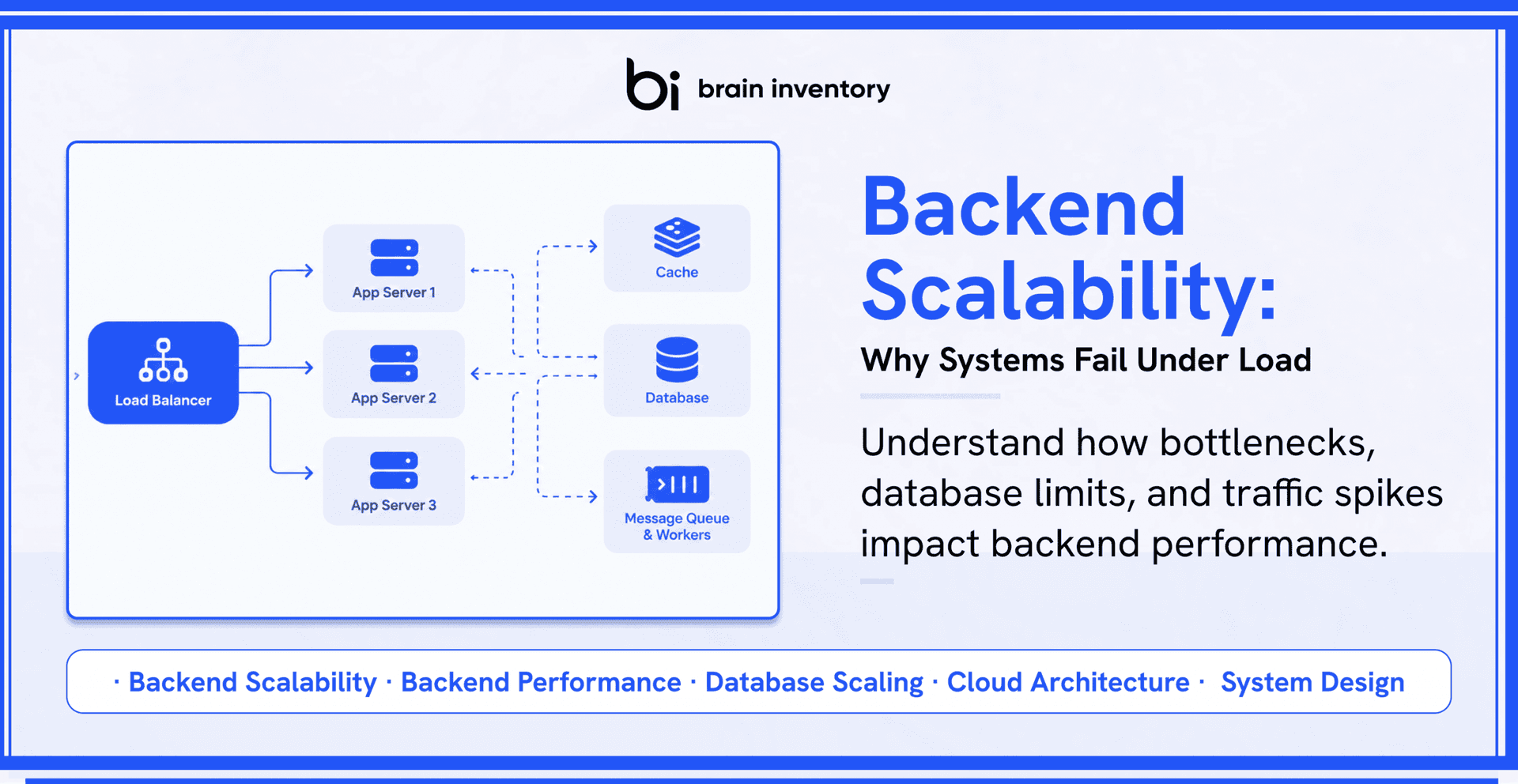
An application can work perfectly during its early stages and still struggle when its user base expands. Pages that once loaded instantly begin taking longer. APIs return inconsistent response times. Transactions remain pending, and some requests fail without an obvious explanation.
What makes these situations difficult to diagnose is that the application may not have undergone any major code changes. The infrastructure might even appear to have enough processing power and memory. Yet something within the system is preventing it from handling the additional workload.
This is where backend scalability becomes important. An application does not become scalable simply because its servers can be upgraded or additional instances can be deployed. Every component involved in processing a request has its own capacity. Databases have connection limits, external services impose usage restrictions, caches depend on access patterns, and background workers can process only a certain number of jobs at a time.
When these components cannot keep pace with incoming requests, the entire application begins experiencing performance problems. Understanding which part of the system reaches its limit first is therefore essential to building infrastructure that can support growth without compromising reliability.
What Does Backend Scalability Actually Involve?
Backend scalability refers to an application’s ability to accommodate a growing workload while maintaining acceptable performance and reliability. The workload could increase because more people are using the application, existing users are performing more actions, databases are becoming larger, or the system is processing more transactions simultaneously.
These changes place different kinds of pressure on backend infrastructure. An application handling thousands of read requests has different requirements from one processing thousands of financial transactions. Similarly, a platform that receives consistent traffic throughout the day faces different challenges from one that experiences sudden bursts of activity.
It is also important to distinguish scalability from backend performance. Performance tells us how efficiently an application handles its existing workload. Scalability tells us whether that efficiency can be maintained when the workload changes.
For example, an API might process 1,000 requests per second with an average response time of 120 milliseconds. However, when demand reaches 8,000 requests per second, the response time could increase significantly because database connections, memory or another shared resource cannot support the additional activity.
The real question is not whether the application works under its current conditions. It is whether its architecture can accommodate the next level of demand without creating new operational problems.
Why Do Backend Systems Struggle When Traffic Increases?
Most backend scalability issues develop when one component starts receiving more work than it can process efficiently. Requests begin accumulating, resources remain occupied for longer, and other components must wait for the delayed operations to finish.
Consider an application where users submit requests through an API. The API server processes those requests, retrieves information from a database and sends the results back to the user. Everything works smoothly when the request volume is manageable.
Now imagine that the number of incoming requests increases several times over. The application servers can process more requests, but the database still has the same connection capacity. As more operations compete for those connections, some requests spend additional time waiting. Eventually, response times increase across the application.
Adding application servers might increase the number of requests reaching the database, but it does not automatically increase the database’s ability to process them.
This distinction explains why backend scalability cannot be evaluated by looking at individual infrastructure components. Their capacity, dependencies and interactions determine how much workload the complete system can support.
1. Database Bottlenecks Can Restrict Application Growth
As an application gains users, its database usually handles a larger volume of reads, writes and updates. Operations that were insignificant during the initial development stage can become expensive when thousands of requests execute them simultaneously.
One example is an inefficient query that retrieves more information than the application actually needs. When executed occasionally, its impact might be difficult to notice. When the same query runs repeatedly across multiple application instances, it can consume substantial database resources.
Several other problems can contribute to database bottlenecks:
- Missing indexes: Queries may take longer because the database has to examine more records to locate the required information.
- N+1 queries: An application may execute additional database queries for individual records instead of retrieving related information efficiently.
- Long-running transactions: Operations that remain open for extended periods can hold locks and interfere with other transactions.
- Connection pool limits: Requests may wait when all available database connections are occupied.
- Lock contention: Multiple operations competing for the same resources can delay one another.
Improving database scalability starts with understanding how the application accesses information. Query optimization, appropriate indexing and connection management can often address problems before the team needs to introduce more complicated infrastructure.
Different workloads may also require different approaches. Read-heavy applications can benefit from caching and read replicas, while applications with substantial write activity may need batching, partitioning or more carefully distributed data operations.
The important part is identifying what the database is struggling with instead of assuming that additional computing capacity will resolve every performance issue.
2. Horizontal Scaling Does Not Remove Every Limitation
When an application starts approaching the limits of its existing servers, one possible solution is horizontal scaling. Instead of upgrading a single machine, the infrastructure adds more application instances to distribute incoming requests.
A load balancer can direct traffic across these instances, allowing multiple servers to process requests simultaneously. This approach works particularly well when application instances can operate independently.
However, adding more instances can create additional pressure on shared resources.
Consider the following architecture:
Users → Load Balancer → 20 API Servers → One Database
The application layer now has more processing capacity. But all twenty servers still depend on the same database. If that database cannot handle the combined workload, increasing the number of API servers will not solve the underlying limitation.
The same issue can occur with shared authentication services, caching systems, message queues and external APIs. Each dependency introduces its own capacity considerations.
Horizontal scaling is useful when the application layer needs additional resources. It becomes less effective when the actual constraint exists somewhere else in the request path.
Before expanding infrastructure, engineering teams need to establish whether the application servers are genuinely the limiting factor or whether additional instances will simply send more work toward an already overloaded component.
3. Stateful Applications Can Complicate Server Distribution
Adding application instances is easier when requests can move between servers without depending on information stored inside a particular machine.
Problems arise when an application stores important session information in the local memory of an individual server.
Imagine a user logs into an application and their session information is stored on Server A. Their next request reaches Server B, which does not have access to that information. The application may no longer recognise the user as authenticated.
One way to handle this situation is through sticky sessions, where requests from a particular user are directed to the same server. Although this can address certain session-related problems, it also introduces a dependency on individual instances.
A more flexible approach is to keep shared application state in systems designed to make it accessible across instances. Depending on the requirements, this could involve a database, distributed cache or another shared storage mechanism.
This allows application servers to process requests without depending on information held exclusively in their own memory. It also makes replacing failed instances and distributing traffic considerably easier.
Stateless application architecture does not mean that user information or application state disappears. It means that the application does not depend on one particular server to retain information required by other instances.
4. Synchronous Operations Can Keep Requests Waiting
Not every operation initiated by a user needs to finish before the application returns a response. Some activities require considerable processing time but have little impact on what the user needs immediately.
Generating reports, processing uploaded images, sending notifications and preparing downloadable documents are common examples.
If an application performs all these operations within the original request, the user has to wait until every task finishes.
The request might follow this sequence:
User → API → Database → Report Generation → Email Notification → Response
When several users initiate similar operations simultaneously, the application can accumulate long-running requests. These requests occupy resources for longer and may reduce the capacity available for incoming traffic.
Background processing provides another way to handle such workloads.
User → API → Message Queue → Immediate Response
The application places the task in a queue and returns a response without waiting for the complete operation. Separate workers retrieve queued jobs and process them independently.
This arrangement allows background processing capacity to grow separately from the API layer. However, it introduces another metric that needs attention: queue depth.
If incoming jobs consistently arrive faster than workers can complete them, the queue will continue growing. Therefore, teams need to monitor processing rates, worker capacity, retry activity and the time jobs spend waiting.
5. Caching Can Reduce Workload, but Poor Implementation Creates Problems
Applications frequently retrieve the same information multiple times. Product details, user preferences, configuration settings and frequently accessed records may be requested repeatedly even when their underlying values have not changed.
Sending every request to the database creates unnecessary work. Caching reduces this repetition by temporarily keeping frequently accessed information in a faster storage layer.
However, caching introduces its own design considerations.
Suppose an application stores thousands of frequently requested records in a cache. If those records expire at approximately the same time, incoming requests may suddenly return to the database to retrieve them again. This can produce a cache stampede, where the database receives an unusually high number of requests within a short period.
Another problem occurs when cached information becomes outdated. If the application does not manage invalidation properly, users may receive information that no longer reflects the latest database values.
Effective caching requires decisions about expiration periods, invalidation rules, eviction policies and what should happen when the cache becomes unavailable.
The objective is not to cache as much information as possible. It is to identify repeated operations that can be avoided without introducing inconsistencies or making another component difficult to manage.
6. Sudden Traffic Spikes Can Expose Capacity Problems
Some applications receive relatively predictable traffic. Others experience sharp increases during product launches, promotional campaigns, ticket releases or seasonal events.
A system that handles its normal workload comfortably might respond very differently when thousands of additional requests arrive within a short period.
One reason is that different infrastructure components do not necessarily expand at the same speed. Application servers might scale out automatically, but database connections, external API quotas and background processing capacity may remain unchanged.
As requests accumulate, response times increase. Some operations exceed their time limits, and users may attempt them again. These retries create additional requests while the infrastructure is already struggling.
Autoscaling can help by adjusting infrastructure capacity according to demand, but it cannot guarantee that every dependency will expand quickly enough.
Applications need safeguards such as sensible request limits, timeouts, controlled retries and backpressure. These mechanisms help prevent one overloaded component from creating problems throughout the system.
Capacity planning should also consider how quickly traffic can increase, not just the total number of requests the application expects to receive.
7. High CPU Usage Is Not Always the Main Performance Indicator
When investigating a slow backend, CPU utilisation is one of the first metrics engineering teams often examine. While it provides useful information, it does not explain every performance problem.
A server can have available processing capacity while thousands of requests remain stuck waiting for database connections, network responses or external services.
In this situation, increasing CPU capacity will have little impact because the application is spending more time waiting than executing instructions.
Understanding this difference helps teams identify the actual backend bottlenecks.
For example, consistently high CPU utilisation could indicate expensive calculations, inefficient application logic or excessive processing. Meanwhile, high response times combined with relatively low CPU usage may point toward slow database operations, network delays or connection pool exhaustion.
The same reasoning applies to background workers. If jobs continue entering a queue faster than workers can complete them, increasing the number of API servers will not address the processing backlog.
Performance diagnosis needs to account for resource utilisation and the time requests spend waiting for different components.
How to Identify What Is Limiting Backend Scalability
Changing infrastructure without understanding the problem can increase operational costs without improving the user experience. A more reliable approach is to examine the complete request journey and determine where delays begin.
Start by collecting information about request volume, throughput, error rates, resource utilisation and response times. Database query duration, active connections, queue depth and external service latency can provide additional clues.
Average response time is useful, but it does not always represent what users experience. An application might have a reasonable average while a smaller percentage of requests take considerably longer to complete.
This is why percentile measurements matter. The p95 response time represents the threshold within which 95% of measured requests complete, while p99 represents the corresponding threshold for 99% of requests.
Distributed tracing can provide another level of visibility. It follows an individual request across different services and shows how much time each component contributes to the complete operation.
For example, an API request taking two seconds might spend only 150 milliseconds executing application logic. Most of the remaining time could be spent retrieving database records and waiting for an external service.
Without visibility into these individual operations, the team might spend time optimising application code even though it contributes very little to the overall delay.
Monitoring should therefore help answer three questions: where is the application spending time, which resource is approaching its limit, and how does that limitation affect the rest of the system?
How Scalability Testing Helps Prevent Production Failures
Testing an application with a small number of users cannot establish how it will behave when demand increases substantially. Teams need to evaluate the system at different workload levels before relying on it in production.
Scalability testing helps establish how application performance changes as traffic, concurrent activity and processing requirements increase.
Different testing methods reveal different weaknesses:
- Load testing: Examines application behaviour under an expected level of traffic.
- Stress testing: Increases the workload beyond normal operating conditions to identify capacity limits.
- Spike testing: Introduces sudden traffic increases to observe how quickly the system responds and recovers.
- Endurance testing: Runs workloads over an extended period to identify gradual performance degradation and resource leaks.
Testing should reflect how people actually use the application. Sending identical requests repeatedly may not reproduce the same conditions as a real application where users perform different operations, access different records and generate varying workloads.
Teams should also evaluate error rates, throughput, resource utilisation and p95 and p99 latency during testing. Successful responses alone do not establish whether an application can maintain an acceptable user experience under pressure.
The results provide a clearer understanding of how much workload the existing architecture can support and which components need attention before deployment.
What Makes a Backend Architecture Scalable?
There is no single framework, database or infrastructure tool that automatically makes an application scalable. The effectiveness of a solution depends on the problem it addresses.
Introducing Redis will not correct inefficient database queries. Adding Kubernetes will not remove a third-party API’s usage restrictions. Increasing the number of application servers will not improve a database that is already operating beyond its practical capacity.
A scalable backend comes from matching architectural decisions to actual workload requirements.
For one application, that might involve optimising database queries and introducing read replicas. Another might need background workers to separate expensive processing from user-facing requests. A different system may benefit from distributed caching, better connection management or additional application instances.
Other important considerations include:
- Distributing incoming traffic without creating unnecessary dependencies between application instances.
- Keeping shared application state accessible across servers.
- Setting appropriate limits for database connections and external service requests.
- Separating time-consuming operations from the main request cycle.
- Monitoring queues and preventing workloads from accumulating indefinitely.
- Testing infrastructure against realistic traffic patterns before production deployment.
The objective is to build an architecture where individual components have enough capacity for their responsibilities and where a limitation in one area does not unnecessarily affect the entire application.
Conclusion
Adding more users should not mean constantly rebuilding the backend to accommodate them. However, an application’s ability to grow depends on whether its architecture can handle the additional work being introduced.
A database might become slower as queries increase. Application servers might compete for limited connections. Background jobs might accumulate faster than workers can process them. Even an external service can become the reason an otherwise healthy application starts responding slowly.
These problems require different solutions, which is why increasing infrastructure capacity should not be the automatic response to every performance issue.
Engineering teams need to understand how requests move through the application, which components handle the workload and where processing begins to slow down. Once those limitations become visible, architectural improvements can address the actual source of the problem.
At Brain Inventory, we understand that backend architecture needs to account for both present requirements and future application demands. Our software development approach focuses on building systems with the performance, reliability and flexibility needed to support evolving business requirements.
Explore Brain Inventory to learn more about our software development capabilities and how we can help build backend systems that are ready to grow with your business.

Have an idea?
Get in touch, we’d be
happy to hear from you
We are always looking out for new collaborations, whether you are a client who is passionate about a project or a talent who is interested in joining our team, our doors are always open.
locate us

India (HQ)
618, Shekhar Central, Palasia Square, A.B Road, Indore, Madhya Pradesh, 452001
+918109561401

United Kingdom
Brain Inventory, SBVS, 8 Roundhay Road, Leeds, UK, LS7 1AB
+18008209286

Canada
44 Main Street East Milton, ONCanada L9T 1N3
+4166696505

Jordan
185 Wasfi Al-Tal Street, Ammon Oasis Complex P.O Box 4724 Amman 11953 Jordan
+960770781000

USA
720 Seneca St Ste 107 Seattle, USA 98101
+1(206)6533419
if it's digital,we'll make it.
- Numetric - Online Accounting Software similar to QuickBooks
- Bloomia - Kegel exercise
- Virifi - Blockchain Powered Document Certification & Signing Platform
- Revolution Travel CRM - Custom CRM Built for Travel Agents
- Fatoura - Online Invoicing Platform
- My Fit Mantra - Your health partner
- Ocureel - Relation Building and video sharing Application




Follow us:


